A GoHighLevel dashboard design agents are glad to come home to
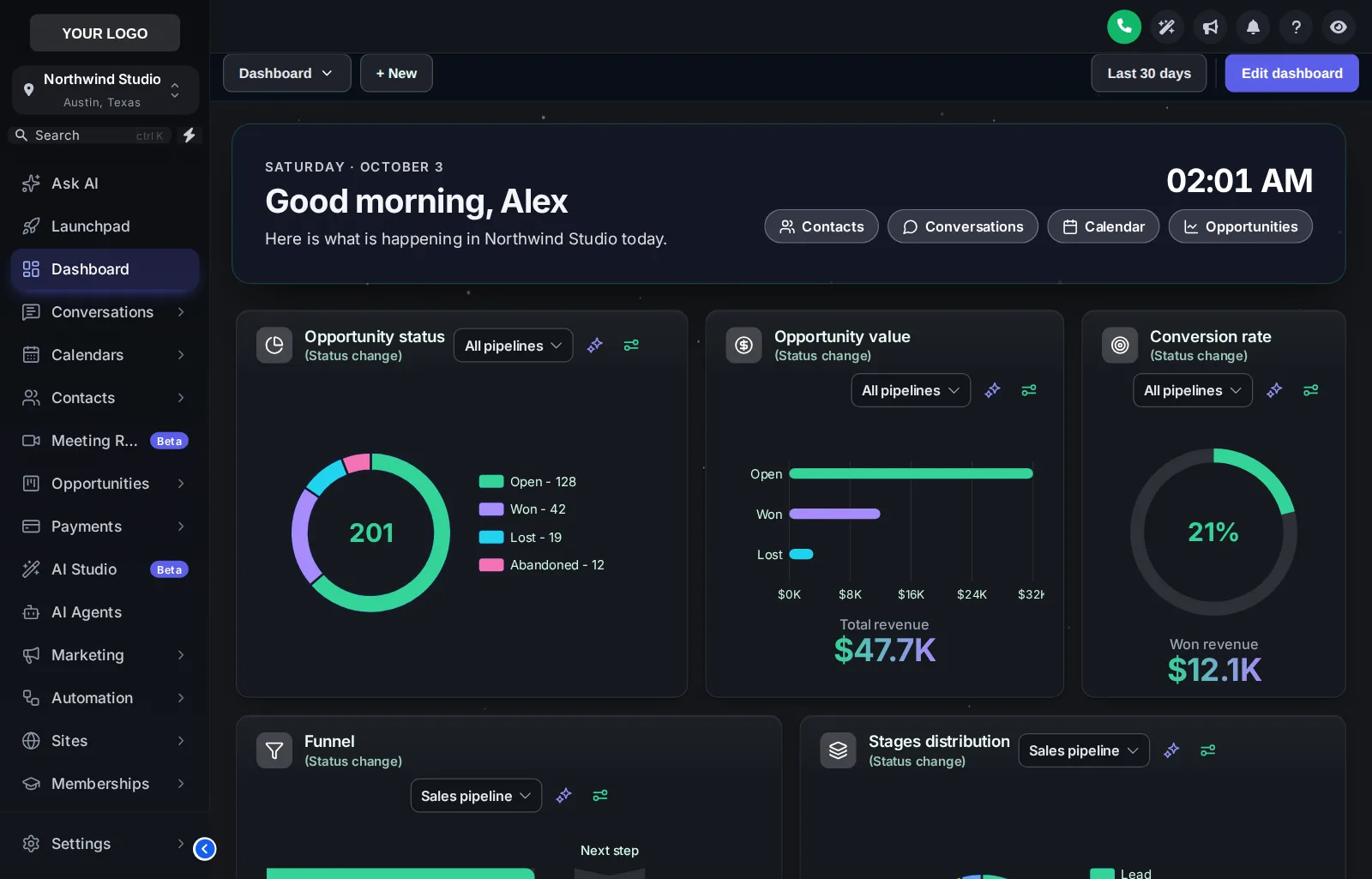
The dashboard is the first room after sign-in. Give it a welcome banner with the agent’s name, a live clock, quick links and chart colours in your brand, in one of 18 designs.
Welcome banner
First name, sub-account name, the date, a live clock and quick links. Gradient, photo, glass or minimal.
Photo backgrounds
Northern lights, a city at night, a lagoon at golden hour, or your own skyline with adjustable shade.
Chart colours in stage order
The first stage gets the first colour, so buyer and listing pipelines both look right.
Widget cards
Background, border, radius, shadow, frosted glass, an accent stripe and card headers in three styles.
What it is: the dashboard designer restyles the GoHighLevel sub-account dashboard with a welcome banner, photo or gradient background, particles, card styles and brand chart colours. It changes the look only; widgets and their numbers stay exactly as GoHighLevel reports them.
Unlocking the showing…
Now showingNorthern LightsEach chip is a real dashboard template applied to a copy of the GoHighLevel dashboard. The clock is live and the quick links are part of the design.
Every dashboard design, by mood
Photo (6)
Northern Lights, aurora photo, dark glass cards, twinkling stars
Pastel Sky, dreamy cloud photo, frosted white cards
City Nights, skyline hero, midnight cards, connected particles
Lagoon, turquoise water hero, fresh teal and white
Golden Hour, sunset mountain hero, warm cream and amber
Liquid 3D, sculpted 3D hero, peach and coral
Dark (3)
Midnight Neon, deep navy, glowing edges, neon charts
Obsidian Gold, black and gold, premium feel
Cyber Grid, dark grid, cyan and magenta light
Light (9)
Aurora Glass, frosted cards on a soft colour mesh
Clean Bento, big rounded tiles, bold numbers, no clutter
Sunset Warm, cream canvas, warm gradient accents
Ocean Pro, corporate blue header bands, crisp cards
Emerald Finance, money-green accents, calm and clear
Candy Pastel, soft pastel mesh, friendly and light
Brand Match, built from your primary colour
Slate Minimal, flat, bordered, quiet and precise
Neo Brutal, thick outlines, hard shadows, loud colour
Furnish it in five minutes
- 01
Pick a design
Open the Dashboard tab in the theme editor, switch the restyle on and click a template: light, dark or photo.
- 02
Write the welcome
Set the banner title and subtitle, choose a photo of your market, particles and chart colours from your brand.
- 03
Save
Every sub-account dashboard picks up the design on its next page load, through the loader you already installed.
Dashboards start in Listing Pro
GoHighLevel dashboard design FAQ
Yes. The customizer restyles the sub-account dashboard: cards, chart colours, numbers, the top bar, the background and a welcome banner above the widgets. There are 18 designs to start from and every value can be changed.
A greeting with the signed-in user’s first name, the sub-account name, the date, a live clock and quick links to Contacts, Conversations, Calendar and Opportunities. You can rewrite it and switch the clock and links off.
Yes. Colours are handed out by position, first colour to the first stage, second to the next, so they fit any pipeline with any number of stages, whatever the stages are called.
Yes. 6 designs are built around a photo. Upload your own image or paste a link, and set how much shade sits behind the text so it stays readable.
No. It only changes how the dashboard looks. The widgets, their data and GoHighLevel’s own dashboard settings stay as they are.
Yes. 5 designs are dark, with light text on dark cards, including Northern Lights, shown in the preview with the Graphite Pro theme.
Yes. It sits on top of the theme, so the sidebar and header keep their look. Use the Sidebar chips in the preview to try combinations.
Listing Pro ($617 one-time) and Luxury Estate.
They are light, run behind the widgets and stop when the page is left. If an agent prefers less motion, the design can run without them.
Next door to the living room
- The showing schedulePipeline board designs12 opportunities board designs with stage colours by position, so every pipeline from new lead to closed picks them up.From Listing Pro
- The key boxContact actions barQuick tags and one-tap buttons on the contact page that start workflows and fill custom fields from a short pop-up form.From Listing Pro
- The floor planMenus & navigationRename, reorder and hide menu items, switch to a top bar in 8 styles, add mega menus in 8 styles and a floating quick menu.From Listing Pro
- Paint and finishesThemes & dark mode27 complete GoHighLevel themes, 11 UI kits and dark mode, with GoHighLevel's hard-coded blues remapped to your brand.From Open House
- Curb appealLogin page designs16 animated login page designs covering sign-in, two-factor codes and password reset, delivered as one CSS import.From Open House
Welcome them home every morning.
The dashboard designer, pipeline boards, mega menus and contact actions come together in Listing Pro.
GoHighLevel and HighLevel are trademarks of HighLevel, Inc. Real Estate Snapshot is an independent team and is not affiliated with, endorsed by or sponsored by HighLevel, Inc. The GHL Customizer account runs on the GHL Customer Care customizer platform; GoHighLevel itself is a separate subscription you buy from HighLevel.