
GoHighLevel contact actions: the right key on the first try
Tagging a buyer to start a workflow means opening the tag box, typing, picking and hoping nobody misspelt "hot buyer". Put the tags and buttons your team uses on every contact, one tap each.
Today Six clicks
- Open the tag box, type, pick, check the spelling
- Scroll the record to update the list price
- No trace of who tagged the contact
With the bar One tap
- Quick tags that add or remove instantly
- A short form that fills the right custom fields
- Optional notes saying who did what
In one line: the contact actions bar puts quick tags and buttons on the GoHighLevel contact page; each tap adds, removes or toggles a tag, or opens a form that writes custom fields, and the record updates without a reload.
Unlocking the showing…
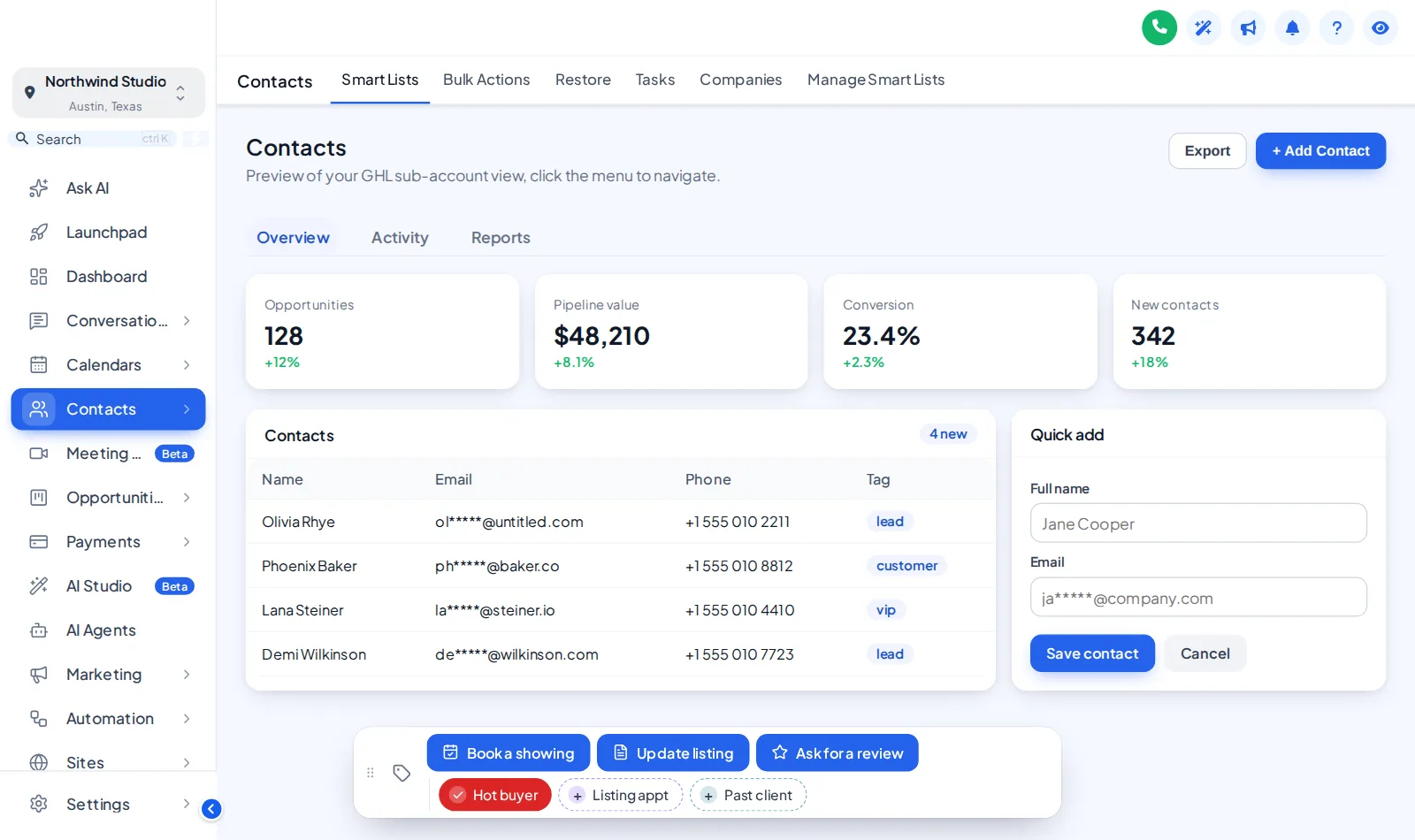
Now showingA colour per tagThe real contact actions bar on a sample contact. Tap a quick tag, open Update listing, or drag the bar by its grip. In this preview nothing is saved; inside GoHighLevel the contact updates at once.
Six keys most agents would cut first
Examples of how a team might wire the bar to its own GoHighLevel workflows. The tags and workflows are yours; the bar just makes them one tap away.
| On the bar | Kind | Tag or fields | Workflow it could start |
|---|---|---|---|
| Hot buyer | Quick tag | hot buyer | Moves the contact to a daily call list and alerts the listing agent |
| Book a showing | Button | book showing | Sends the buyer your showing calendar link by SMS |
| Listing appt | Quick tag | listing appointment | Starts the pre-listing packet email and a reminder task |
| Update listing | Button with form | (custom fields) | Writes list price, listing date and lead source to the contact |
| Past client | Quick tag | past client | Enrols the contact in your sphere nurture and anniversary touches |
| Ask for a review | Toggle button | review request | Triggers the post-closing review request; tap again to remove |
Three steps, no code for your team
- 01
Add tags and buttons
In the Contact actions tab, add the quick tags and buttons your agents need, with colours, icons and success messages.
- 02
Connect your workflows
Point each tag or button at the tags your GoHighLevel workflows listen for, or at the custom fields a form should fill.
- 03
Save
The bar appears on every contact page in the sub-accounts you chose, on the next page load.
Contact actions start in Listing Pro
GoHighLevel contact actions FAQ
A small bar on the GoHighLevel contact page with quick tags and buttons. One tap adds or removes a tag to start a workflow, and a button can open a short form that writes straight into custom fields.
Yes. Buttons add, remove or toggle tags, so any workflow with a "tag added" or "tag removed" trigger starts from one tap, such as a showing confirmation or a review request.
Any custom field in the sub-account, matched by name, key or id. Each form field has a type, such as text, paragraph, number, date, drop-down, email, phone or link, and can be required.
Through GoHighLevel’s own API using the signed-in user’s session, the same calls GoHighLevel’s screens make. An agent can only do what their GoHighLevel permissions already allow.
If you want it to. A note can be added to the contact saying which tag was added or removed and by whom, and which field changed from what to what.
Yes. Each tag and button can be shown in every sub-account or only in the ones you list.
No. The preview runs the real bar on a sample contact, but nothing is sent anywhere. Inside GoHighLevel the same taps update the contact at once.
Yes. It starts in one of 6 positions, agents can drag it by its grip, it remembers the spot, and a double-click on the grip puts it back.
Listing Pro ($617 one-time) and Luxury Estate.
Building the workflows behind the tags? The Real Estate Snapshot workflows ship 50+ of them.
Rooms on the same floor
- The showing schedulePipeline board designs12 opportunities board designs with stage colours by position, so every pipeline from new lead to closed picks them up.From Listing Pro
- The living roomDashboard designs18 sub-account dashboard designs with a welcome banner, live clock, quick links, photo backgrounds and brand chart colours.From Listing Pro
- The floor planMenus & navigationRename, reorder and hide menu items, switch to a top bar in 8 styles, add mega menus in 8 styles and a floating quick menu.From Listing Pro
- The yard signPopups43 popup templates in 7 formats for inside GoHighLevel and on your websites, with triggers, targeting and stats.From Luxury Estate
Hand every agent the right keys.
Contact actions, dashboards, pipeline boards and mega menus come together in Listing Pro, one payment, lifetime access.
GoHighLevel and HighLevel are trademarks of HighLevel, Inc. Real Estate Snapshot is an independent team and is not affiliated with, endorsed by or sponsored by HighLevel, Inc. The GHL Customizer account runs on the GHL Customer Care customizer platform; GoHighLevel itself is a separate subscription you buy from HighLevel.