If you’ve ever asked yourself how to get more referrals without manually asking for them, chasing leads, or sending awkward follow-ups this one’s for you. In today’s competitive market, referrals are golden. But relying on memory or hope to get them? Not so much.
Thankfully, with the power of GoHighLevel, you can fully automate your referral system—from the ask to the thank-you to keeping your clients engaged for years to come.
In this article, we’ll walk you through how to build a smart, scalable real estate referral automation system inside GoHighLevel. Whether you’re a solo agent or part of a growing brokerage, this setup will help you turn happy clients into loyal brand ambassadors—on autopilot.
Key Takeaways
- Automating referrals saves time and increases repeat business
- GoHighLevel offers workflows, smart tags, and nurture campaigns to streamline referrals
- You can trigger referral asks after key client milestones like closing or post-review
- Personalized texts, emails, and review prompts drive higher engagement
- A solid system creates consistent leads without awkward manual outreach
Why Referrals Matter More Than Ever
In real estate, trust is everything, and nothing builds trust faster than a warm referral. Research shows:
- 92% of consumers trust referrals from people they know
- Referred customers have a 37% higher retention rate
- Referral leads convert 30% better than cold leads
But most agents miss out on consistent referrals because they lack a system. That’s where automation changes the game.
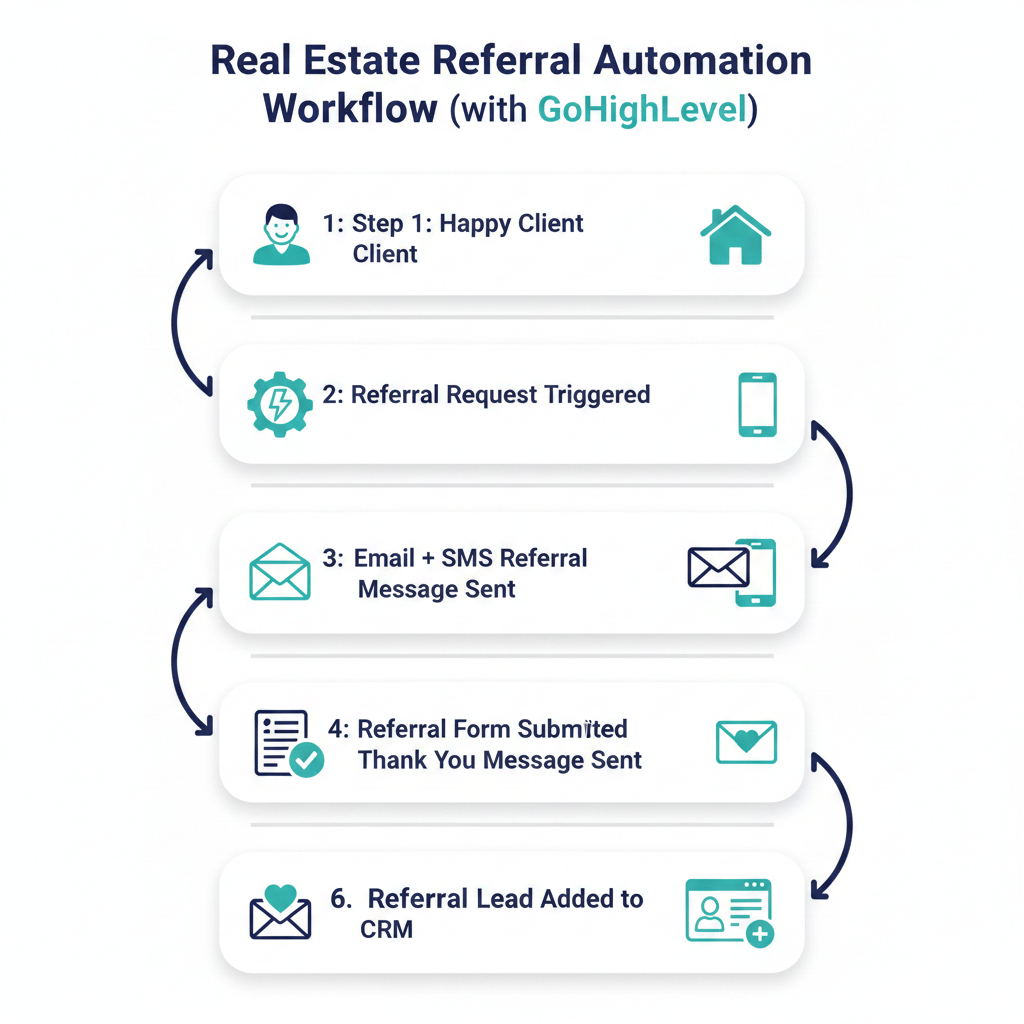
Setting Up a Real Estate Referral System in GoHighLevel
GoHighLevel is designed for automation, making it the ideal tool to launch a done-for-you referral engine that operates while you’re asleep.
Step 1: Map the Referral Journey
Before jumping into the platform, map out the ideal referral journey for your clients. A basic referral funnel looks like this:
- The client has a great experience
- You ask for a referral at the right time
- Client shares your info or link
- Referral gets a warm welcome
- You thank the referrer and nurture both relationships
Each step can be automated in GoHighLevel using workflows, tags, triggers, and smart messaging.
Step 2: Trigger the Referral Workflow
Choose the right moment to ask for a referral. In real estate, timing is everything. You might trigger it:
- Right after closing day
- 48 hours after collecting a 5-star review
- Following a thank-you message or testimonial
In GoHighLevel, set a trigger like:
- The pipeline stage is “Closed Won.”
- The tag is added: “Happy Client.”
- The review rating is 5 stars
Once triggered, the referral campaign workflow begins.
Stop Losing Leads You Already Paid For
Step 3: Build the Automated Workflow in GoHighLevel
Inside the workflow builder, create a referral sequence that feels natural and helpful—not spammy.
Here’s a simple structure:
Email #1: Friendly Referral Ask
Subject: “Know someone buying or selling?”
- Thank them for working with you
- Mention how referrals are the highest compliment
- Provide an easy link or reply option to refer someone
SMS #1: Short and Sweet
“Hi [Name], just checking in! If you know someone looking to buy or sell, I’d love to help. Here’s a quick link to share with them 👉 [referral form URL]”
Wait 3 Days
Email #2: Social Proof + Reminder
- Share a quick story of someone who came from a referral
- Reaffirm how much you appreciate their support
- Include the referral link again
Workflow Actions
- Tag the client as “Referral Asked.”
- If a referral comes in, tag the original client as “Referral Given.”
- Automatically send a thank-you gift, note, or notification
- Add both to the “Lifetime Nurture” sequence
Everything above can be fully automated in GoHighLevel workflows—no coding needed.
How to Personalize and Optimize Referral Messages
Personalization increases response rates. GoHighLevel allows you to insert custom values (such as first name, service dates, and even testimonial links) into every message.
Personal Touches to Include
- Their name and the property address
- A specific compliment or callback to your experience
- Their review or testimonial quote
- A “thank you” gift mention (optional)
Use custom values in your email and SMS templates to dynamically populate these fields.
Best Practices for GoHighLevel Referral Campaigns
To make your referral automation feel authentic and effective:
✅ Keep it warm—use casual, friendly language
✅ Be clear – Tell them exactly how to refer someone
✅ Make it easy – Use 1-click referral forms or reply prompts
✅ Reward and recognize – Even a thank-you goes a long way
✅ Stay compliant – Don’t incentivize in a way that breaks state licensing laws
Adding a Referral Form or Landing Page
GoHighLevel lets you build a referral form or page in minutes. You can:
- Create a form asking for the referral’s name, phone number, and reason for interest
- Embed it on your website or send the link via text/email
- Trigger automations when someone submits the form
Bonus tip: Use custom domains and branded short links to boost click rates.
Nurture Clients for Ongoing Referrals
Don’t stop at one ask. With GoHighLevel, you can keep your past clients engaged with:
- Seasonal homeownership tips
- Anniversary texts or birthday emails
- Client appreciation events
- Referral reminders every quarter
These can all be pre-scheduled in GoHighLevel’s Lifetime Nurture Campaigns, ensuring your brand stays top of mind.
GoHighLevel Makes Referral Automation Easy
Why use GoHighLevel for real estate referrals?
- All-in-one CRM and automation platform
- Workflow builder with drag-and-drop ease
- SMS, email, voicemail, and call automation in one place
- Contact tagging and smart segmentation
- Built-in review requests and survey logic
Once it’s live, your referral system runs on autopilot—freeing you to focus on closings and client service.
Revive Your Dead Leads in Days Not Months
Old leads aren’t lost — they’re waiting. Our snapshot revives your database, cuts no-shows, and fills your calendar. One system, lifetime access, no fees.
Frequently Asked Questions
How soon should I ask for a referral after closing?
Can I automate referral rewards too?
What if a client doesn’t refer anyone?
That’s okay. Continue nurturing them over time. Most referrals come after months—not days.
Does GoHighLevel track referrals?
Is this compliant with real estate laws?
What happens after 15 days of support?
Do I need to integrate third-party tools?
Conclusion
A great referral doesn’t just bring in business; it’s a sign you delivered amazing service. But instead of waiting and hoping for referrals, GoHighLevel empowers you to build a proactive system that works around the clock.
Set it up once, keep it personalized, and let the platform nurture your network for you.
Whether you’re a solo agent or managing a brokerage, automated referrals through GoHighLevel will help you close more deals, earn more trust, and grow your business without working longer hours.
Start building your referral engine today. Your future clients (and future self) will thank you.
Ready to Close More Deals?
Don’t lose another lead automate calls, texts, and follow-ups today.