

If you’re a realtor diving into the world of automation, there’s a good chance you’ve heard of GoHighLevel, and for good reason.
With its all-in-one CRM, smart automations, AI assistant, and social tools, it’s a powerful platform built to help you convert more leads with less manual work.
But here’s the catch…
Many real estate professionals are only scratching the surface or, worse, misusing it altogether.
In this article, we’ll break down 7 of the most common mistakes realtors make with GoHighLevel, how these mistakes are costing you leads (and time), and most importantly, how to fix them fast.
Key Takeaways
- Most realtors don’t fully customize their pipelines and automations
- Ignoring AI tools like the AI Receptionist and Chatbot reduces lead conversion
- Not setting up calendars, reminders, or missed-call texts leads to lost clients
- Compliance oversights can get your number blocked or reduce deliverability
- Quick fixes and best practices can save hours and boost your ROI
1: Not Customizing Pipelines to Fit the Real Estate Journey
Problem: GoHighLevel comes with ready-made pipelines — but many realtors leave them untouched.
Why it hurts: Your lead journey is not the same as a chiropractor or agency client. Real estate leads go through unique stages like “Buyer Prequalified,” “Property Match Sent,” or “Contract Sent.”
Fix:
- Rename stages to fit YOUR process
- Use custom fields like “ZIP Code” or “Desired Property Type.”
- Use tags for hot leads vs. long-term nurture
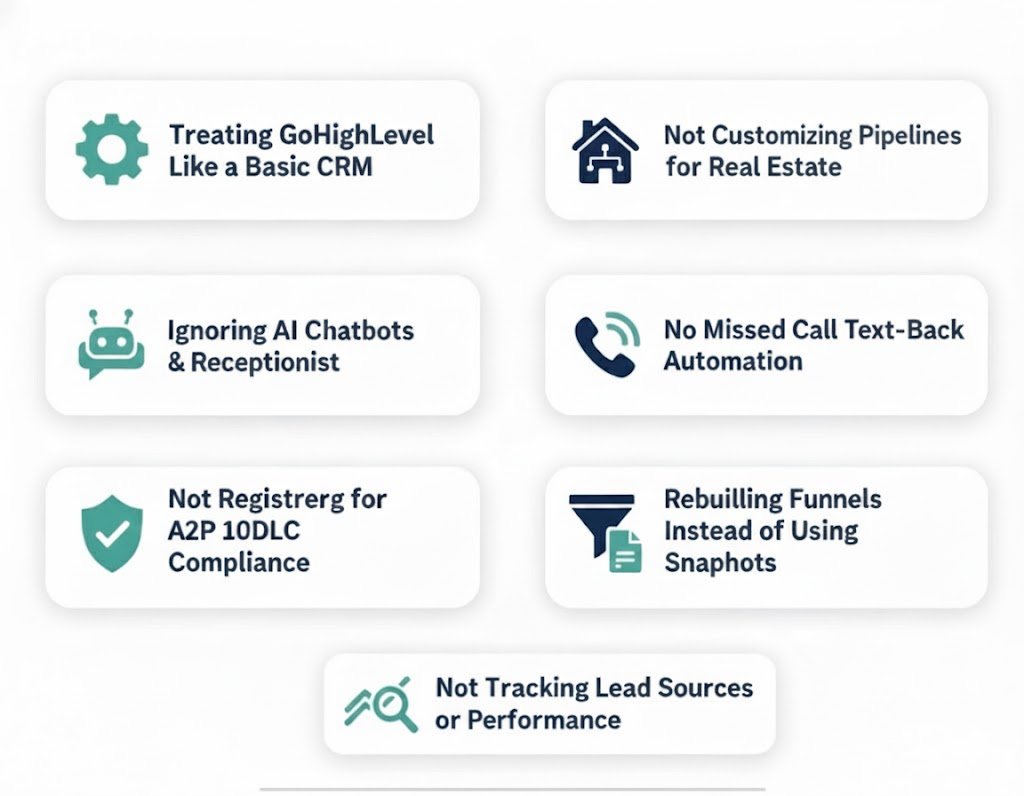
2. Underusing GoHighLevel’s AI Tools for Realtors
Problem: Many agents still manually answer DMs or miss calls while showing homes.
Reality: 27% of buyers go with the first agent who responds. If your voicemail picks up, you’re losing money.
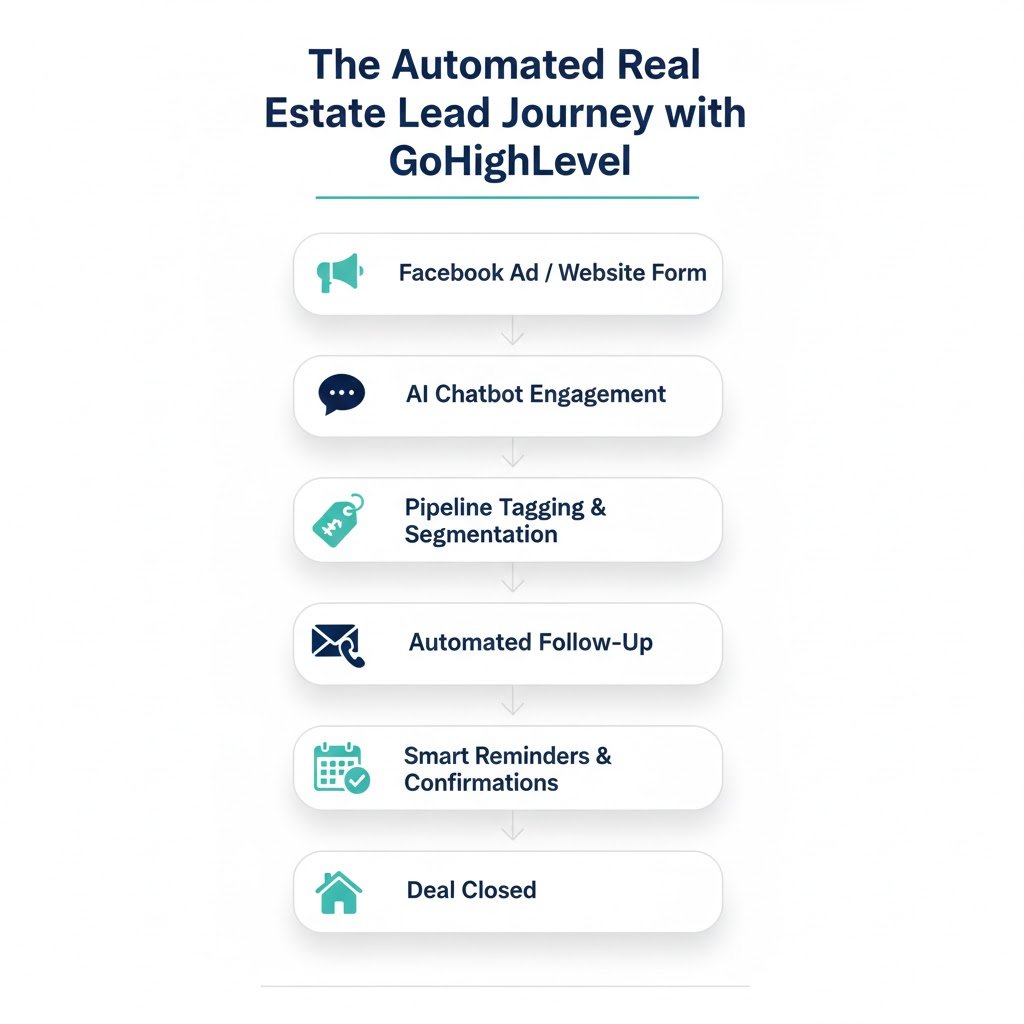
GoHighLevel AI tools like the AI Receptionist and Chatbot can:
- Answer calls 24/7
- Book appointments directly in your calendar
- Respond to texts, website chats, and FB/IG DMs in real time.
- Escalate to a human when needed
✅ Set it up in Settings > Conversation AI
Stop Losing Leads You Already Paid For
3: Skipping Missed Call Text Back and Smart Reminders
Problem: When calls go to voicemail, most leads won’t leave a message; they call another agent.
Solution:
- Enable Missed Call Text Back under Phone Settings
- Add Smart Reminders via Workflows > Appointment reminders
- Customize your text: “Sorry I missed you! Are you looking to schedule a home tour?”
 Stat: Realtors using follow-up automation reduce no shows by up to 50%.
4. Not Using the Calendar Integration Effectively
Problem: Double bookings, missed follow-ups, and scattered appointments.
Fixes:
- Connect your Google or Outlook calendar
- Use a booking link with round-robin if you’re part of a team
- Trigger workflows based on appointment status
Pro Setup:
- Go to Calendars > New Calendar
- Enable event triggers like “Reminder Sent” or “No-Show.”
- Include booking link in funnels and chatbot responses
5: Poor Email and SMS Deliverability from Lack of Compliance
Problem: Not following A2P 10DLC rules can lead to your texts being blocked or flagged as spam.
Solution
- Register your business and number for A2P 10DLC compliance
- Add opt-out messages like “Reply STOP to unsubscribe.”
- Use contact validation to clean your lists
6: Not Tracking Results or Using Reporting Tools
Problem: If you’re not tracking where your leads are coming from or how many convert you’re flying blind.
Fixes:
- Set up attribution on your funnels and ads
- Use GoHighLevel’s built-in Reporting dashboard
- Create workflows that update stages or tags automatically
Example:
- Use UTM tracking on Facebook ads
- Route leads to the right pipeline with automation
- Measure results weekly to optimize campaigns
7: Ignoring Pre-Built Real Estate Funnels and Workflows
Problem: You’re spending weeks building your own workflows when GoHighLevel already has proven templates.
Real estate snapshot users get:
- Multi-pipeline CRM
- Pre-built lead funnels
- AI chatbot & receptionist setup
- Seasonal campaigns (e.g., Spring Home Buyer Promo)
🛠️ Tip: Instead of building from scratch, import the snapshot and customize your branding, colors, and workflows.
Revive Your Dead Leads in Days Not Months
Old leads aren’t lost — they’re waiting. Our snapshot revives your database, cuts no-shows, and fills your calendar. One system, lifetime access, no fees.
Frequently Asked Questions
What is GoHighLevel and why should realtors use it?
GoHighLevel is an all-in-one CRM and marketing platform with automation, AI tools, and built-in funnels perfect for real estate professionals looking to streamline lead management.
Can GoHighLevel automatically respond to new leads?
Yes. With Conversation AI and workflows, it can instantly respond via text, chat, or DM and even book appointments.
Is the Real Estate Snapshot beginner-friendly?
Does GoHighLevel integrate with Facebook and Instagram?
What happens if I miss a call while showing a home?
Is A2P registration really necessary?
Can I use my own domain and branding?
Conclusion
GoHighLevel is one of the most powerful platforms available to real estate professionals today — but power without proper setup is potential left untapped.
Whether you’re new to GoHighLevel or have been using it for months, avoiding these common mistakes can mean the difference between missed opportunities and consistent closings.
✅ Don’t treat it like a generic CRM.
✅ Automate follow-ups and appointment booking.
✅ Use AI to respond when you’re busy showing homes.
✅ Customize it to fit your real estate process.
If you take the time to set it up correctly or better yet, use a pre-built real estate snapshot, you’ll save time, serve your clients faster, and grow your business with far less friction.
The future of real estate is automated, efficient, and AI-assisted.
With GoHighLevel, you’re already halfway there; now it’s time to use it to its full potential.
Ready to Close More Deals?
Don’t lose another lead automate calls, texts, and follow-ups today.